Everything the app does, plainly.
No feature-name bingo. Here's what SurfSeer actually gives you, grouped the way it sits in the app.
Wave-face prediction
SurfSeer predicts the breaking face at your spot — the part you actually ride. The face number is always what's shown, never the raw swell input.
Face height
A predicted rideable face height per spot, accounting for how the swell lines up with your coast, how exposed the break is, and what the bottom does to it.
Quality score
One score out of 100 with a full factor breakdown — swell, wind, tide, period and more — so you can see why the day rates the way it does.
Swell alignment
Every spot knows which way its coast faces. Swell arriving square-on rates highest; the further off-axis, the more it's discounted.
Wind quality
Offshore, cross-shore or onshore relative to your spot, folded straight into the score with a wind-quality ring.
Tide
Your per-spot tide preference feeds the prediction, with tide curves and mini-plots alongside the forecast.
Wave power
How much push the day actually has — height and quality alone don't tell you.
Best-session window
When to paddle out across the forecast horizon, not just what the peak number is.
Wave shape
How it will break, drawn from your spot's floor type and profile. Walling, crumbling, throwing.
Rip-current warning
When conditions raise rip risk, the app says so explicitly.
The real thing
Captured from the current development build — not mock-ups. Spot names are test data for now; the presentation is exactly what ships.
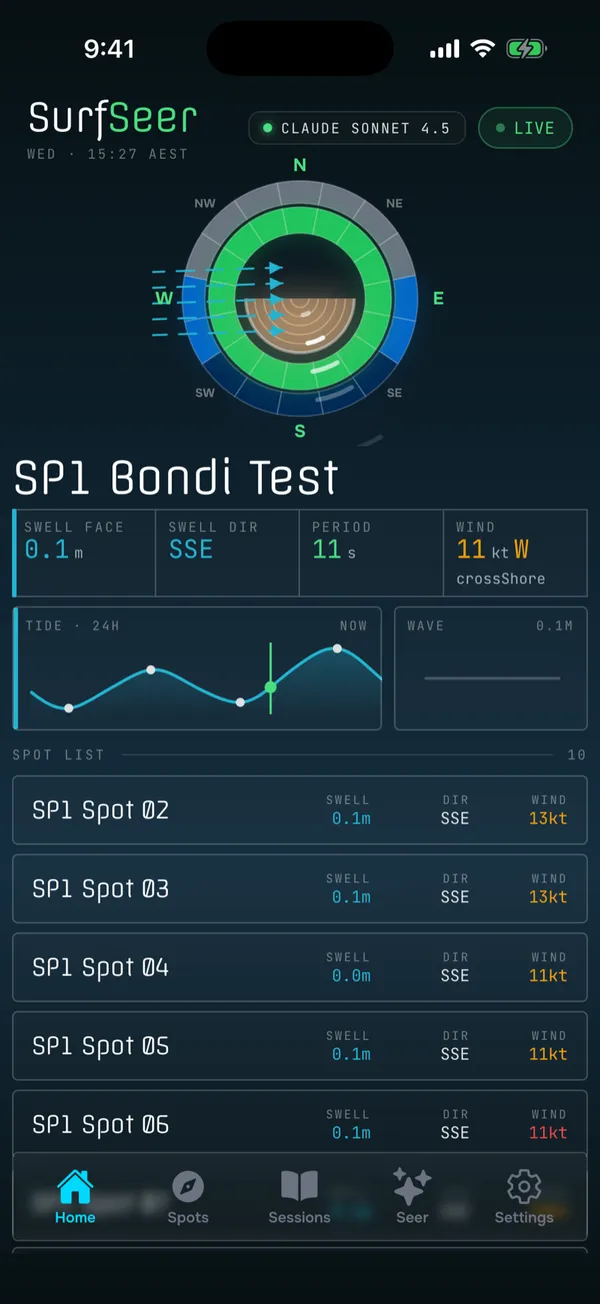
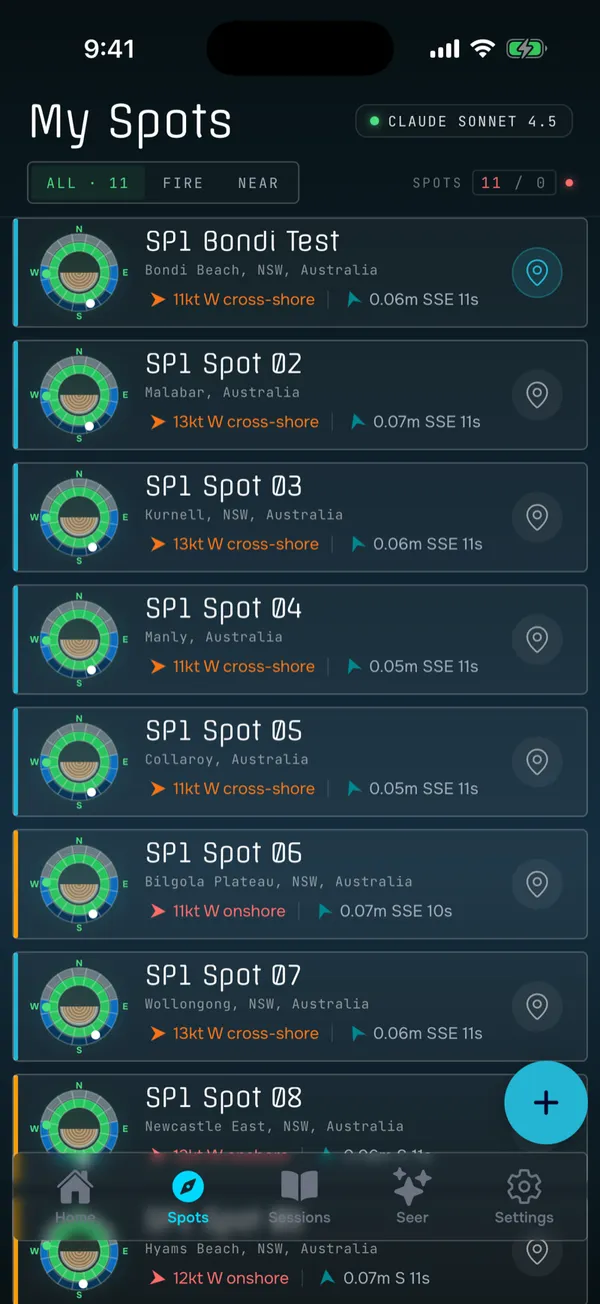
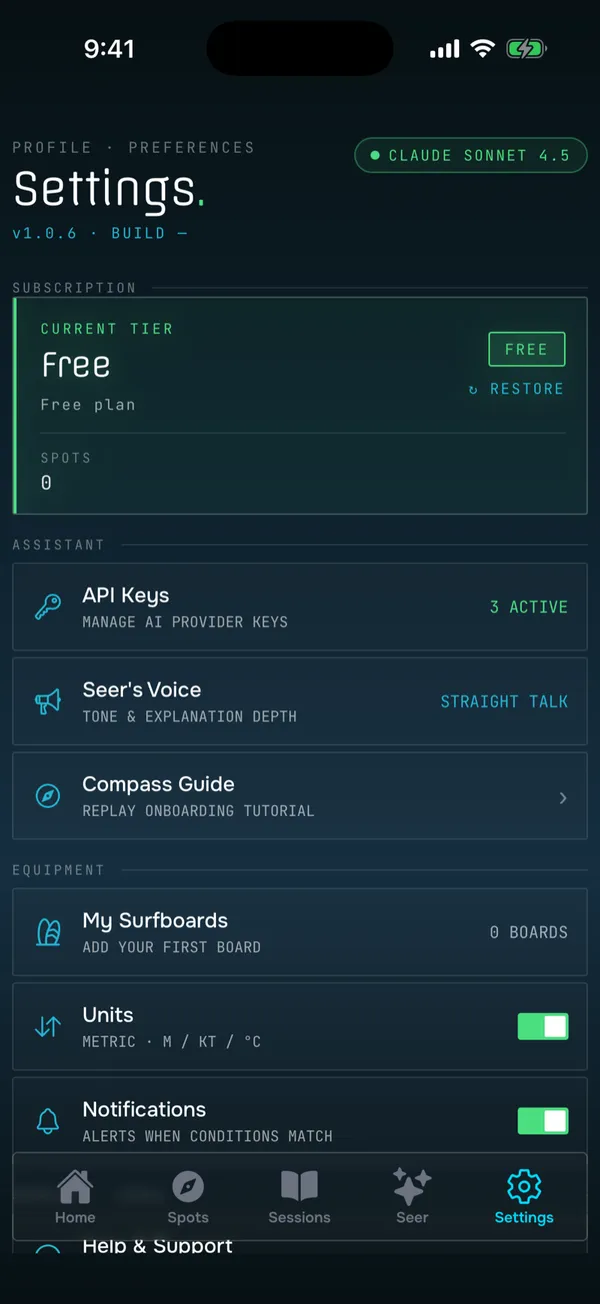
Spots
Build your own list of breaks. Each one gets a profile, a dashboard, and a forecast of its own.
- Add a spot
- Drop a pin on a map, paste a plus code, or just name it — then confirm and analyse.
- Coastline read
- On creation, SurfSeer works out which way the coast faces and how swell from each direction is blocked, limited or enhanced by headlands, islands and the mainland.
- Sea floor
- The bottom beneath the break is read and modelled, so the app can speak about shape as well as height.
- The spot compass
- A layered dual-ring compass is the control surface: tap cells to edit exposure and wind as a draft, then save the profile in one commit. A replayable guide teaches it.
- Per-spot settings
- Floor type, tide range preference, wave-height band and directional profile, all editable.
- Sync
- Spots follow you across devices. Edits made offline queue up and replay when you're back on.
Forecast and live conditions
The current read for your spot, and the days ahead.
- Multi-day forecast
- Swell, wind and weather per spot, turned into an hourly series and a day-by-day timeline.
- Live conditions
- What's happening right now at the spot, with captured-conditions cards.
- Tide
- Daily tide plots and current tide state for each spot.
- Sun times
- Dawn and dusk, so a window means something.
- Freshness
- Forecasts are flagged once they're more than three hours old. You always know how current the read is.
Sessions and the learning loop
The part that makes it sharper the more you surf.
- Log a session
- Date, time, duration, the wave height you actually got, and a rating — on controls built for the job, not a generic form.
- Conditions captured
- What the conditions were at session time is attached to the log automatically.
- Rate the prediction
- Mark it over or under, and by how much. A quick high-level pass, or a full drill-down on every variable.
- Calibration
- Your feedback tunes the model for that spot. When it adjusts, you get told.
- History
- A filterable session list with detail sheets and a recap of predicted versus logged.
The Seer
A conversational read on your spots, grounded in the engine's actual output — not model guesswork.
- Chat
- Ask about conditions, spots and forecasts. Answers come from the prediction engine's output for your actual spots.
- Narrations
- Plain-language read-outs of the day's prediction.
- Seer's Voice
- Pick the personality: Straight Talk, Chill, Coach or Data Nerd. It carries across narrations and chat.
- Bring your own model
- Your API key, from any of five vendors, and your choice of model tier. Privacy, cost and quality are your call.
- Key handling
- Keys live in the device's secure enclave, are sent only in request headers, and never appear in logs.
- Optional by design
- No key or no connection and everything still works engine-only. The Seer is enhancement, not dependency.
Personalisation
The details that make the prediction yours.
- Your height
- Drives the "on you" scaling, so a face height means something concrete.
- Your quiver
- Add and edit your boards. The board you're on feeds the prediction.
- API keys
- Per-vendor key entry and model selection.
- Compass guide
- Replay the spot-compass tutorial whenever you want.
- Subscription
- Manage your plan and upgrades in-app.
- Support
- In-app support, with a human at the end of it.
Offline and reliability
Built for a car park with one bar of signal.
- Offline-first
- Predictions compute on-device. Spots, forecasts, sessions, tides and narrations are cached and served when the network is down.
- Queued edits
- Changes made offline queue in order, survive an app restart, and replay when you're back on — no duplicates.
- Graceful degradation
- Network fails, it falls back to cache. The AI fails, it falls back to the engine. Nothing takes the app down with it.
- iOS and Android
- One codebase, both platforms, same experience.
What SurfSeer isn't
Worth being clear about, because plenty of surf apps are these things.
Have a look at a real week.
Seven days of sample data at one spot, presented exactly as the app does it.
Open the sample week