Everything SurfSeer does
A complete list of the app's features, grouped by where they appear in the app.
Breaking wave height prediction
SurfSeer predicts the height of the waves as they break at your spot. It always shows this height, never the raw swell reading.
- Wave height
- Predicted breaking height for each spot. It accounts for the direction the coastline faces, how open the spot is to each swell direction, and the sea floor.
- Swell direction
- Swell arriving straight at the coast produces the biggest waves. The more it arrives at an angle, the lower the prediction.
- Wind
- Wind from land to sea, along the coast, or from sea to land, measured against the spot's direction and included in the prediction.
- Tide
- Your preferred tide range for each spot is included in the prediction. Tide charts are shown with the forecast.
- Wave power
- How much energy the waves carry, shown next to height.
- Best window
- The best time to surf over the next 7 days, based on your wave type and size range.
- Wave shape
- Whether waves will spill, plunge, surge or collapse, based on the sea floor at the spot.
Spots
Save the places you surf. Each spot has its own settings and forecast.
Spots tab
- Add a spot
- Drop a pin on the map or enter a plus code, then give the spot a name.
- Coastline analysis
- SurfSeer works out which way the coast faces, and which swell directions are open, partly blocked, blocked or strengthened by the surrounding land.
- Sea floor
- SurfSeer analyses the sea floor at the spot so it can predict wave shape as well as height. You can set the floor type: sand, reef, rock, mixed or slab.
- Compass
- Adjust the spot's swell and wind settings on a compass, then save. A guide explains how it works and can be replayed from Settings.
- Wave type and size range
- Choose the type and size of wave you want at each spot. The best window only shows times that match.
- Spot notes
- Add notes such as the best tide or known hazards. They are included in predictions and in the AI assistant's answers.
- Sync
- Spots are saved to your account and appear on all your devices. Changes made offline are sent when you reconnect.
Forecast and current conditions
Current conditions at your spots and the forecast for the next 7 days.
Home tab
- 7-day forecast
- Wave height, swell direction and period, wind, and weather for each spot, hour by hour and day by day.
- Current conditions
- Conditions at the spot right now.
- Tide
- Daily tide charts and the current tide for each spot.
- Sunrise and sunset
- Shown with the forecast, so you can see which windows have daylight.
- Forecast age
- Forecasts older than three hours are marked, so you know how current the data is.
Session log
Record your sessions. Each one improves predictions for that spot.
Sessions tab
- Log a session
- Record the date, time, how much you enjoyed it, and how the waves compared with the forecast. Optional details: board, wave count, crowd, tags and notes.
- Conditions recorded
- The forecast conditions at the time of your session are saved with it automatically.
- Compare with the forecast
- Mark whether wave height, wind, period and swell direction were higher or lower than predicted, and by how much.
- Report without surfing
- Didn't go in? You can still report the conditions you saw.
- Model updates
- After each session, SurfSeer shows what it adjusted for that spot and how confident the forecast is.
- History
- A list of all your sessions with prediction accuracy, filterable by spot.
AI assistant
Ask questions about your spots. Answers are based on SurfSeer's own predictions for your spots.
Seer tab
- Chat
- Ask questions such as "What's the best time this week?" or "Why is the swell dropping?"
- Weekly summary
- A written summary of the week's forecast for each spot.
- Narration styles
- Choose from nine narration styles: Straight Talk, Data Nerd, Surf Guide, Cosmic Surfer, Daggy Dad, Sydney Local, Bay Local, Mother-in-Law and Byron Hippie. Each has a standard and a stronger version.
- Your own API key
- Add a key from one of five supported providers and choose the model.
- Key security
- Keys are stored in your phone's encrypted keychain, sent only in request headers, and never written to logs.
- Optional
- Without a key or a connection, every prediction still works.
Settings
Your details, which personalise every prediction.
Settings tab
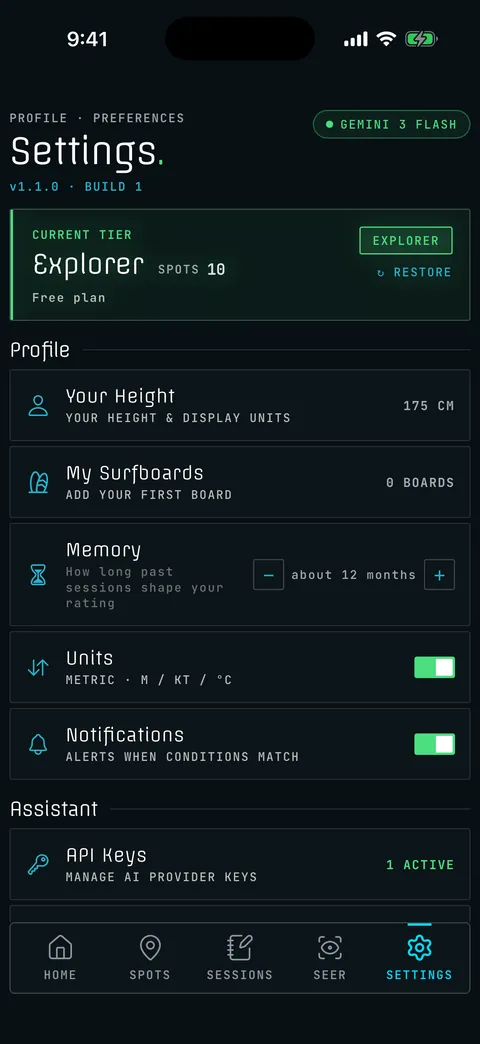
- Your height
- Used to describe wave height against your body, for example chest high or head high.
- Your surfboards
- Add and edit your boards. The board you use is included in the prediction.
- API keys
- Add a key and choose a model for each provider.
- Language
- Use the app in any of ten languages.
- Subscription
- Manage your plan in the app.
- Support
- Contact support from inside the app. A person reads every message.
Offline use
Designed to work with a weak signal or none.
Reliability
- Works offline
- Predictions are calculated on your phone. Spots, forecasts, sessions and tides are saved so they are available without a connection.
- Offline changes
- Changes made offline are saved in order and sent when you reconnect, even after the app restarts.
- Keeps working
- If the connection drops, the app uses saved data. If the AI provider fails, predictions carry on without it.
- iOS and Android
- The same app on both platforms.
Screens from the app
From the current development build. Spot names are test data.
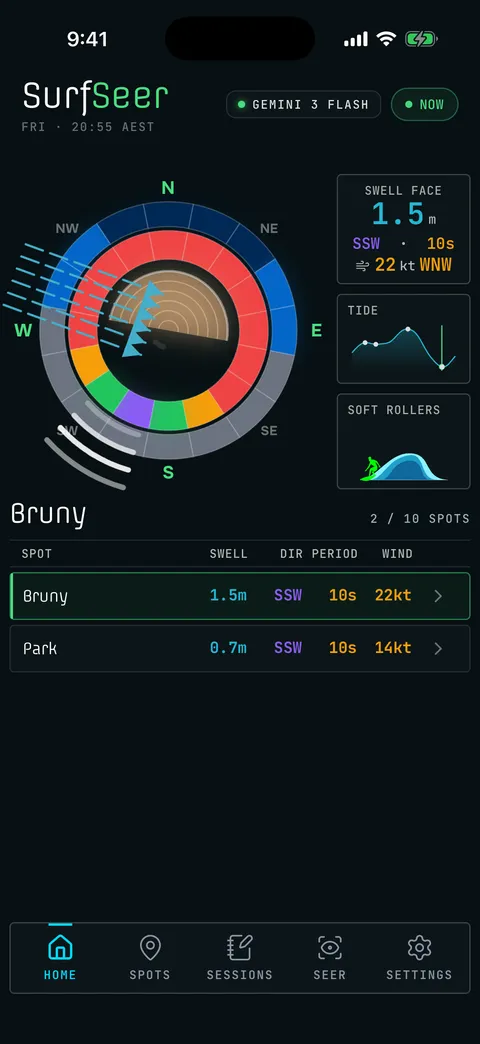
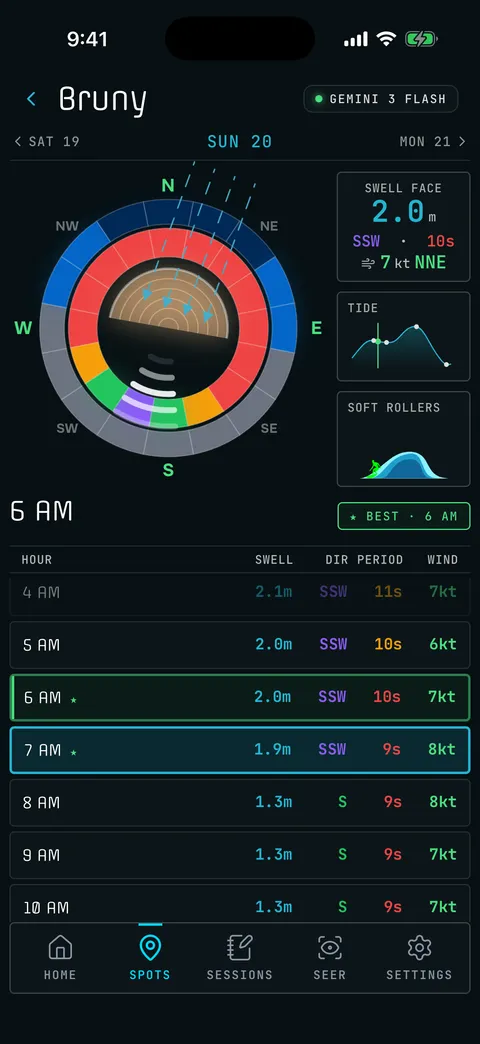
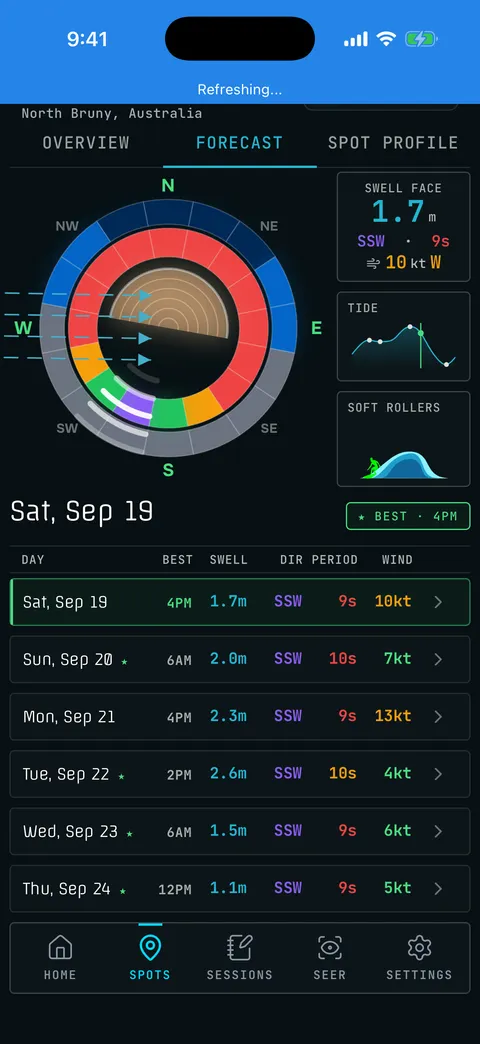
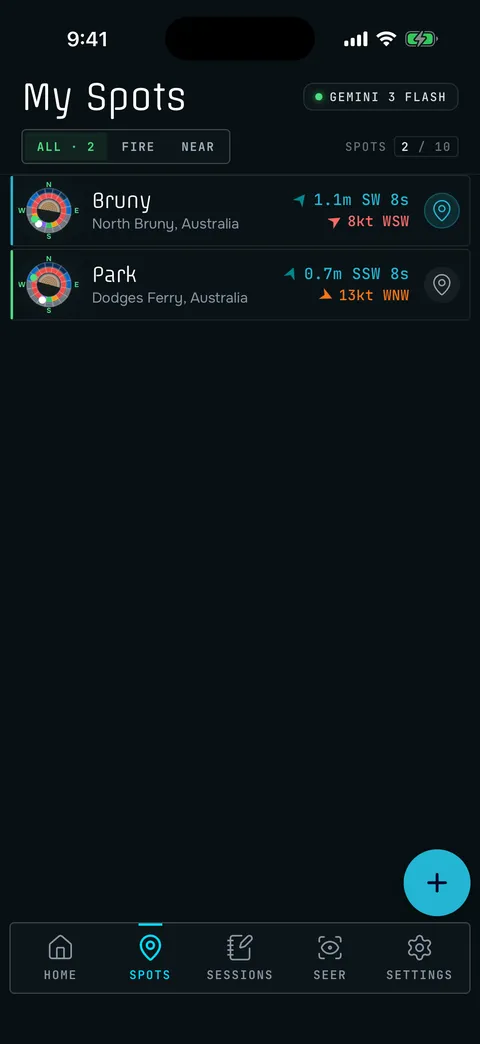
Coming soon
Three more screens will be added with the next build.
- Screenshot coming
Spot setup: adjusting swell and wind directions on the compass.
- Screenshot coming
Session log: recording how the prediction compared.
- Screenshot coming
AI assistant: a question about a spot, answered.
What SurfSeer does not do
To be clear about what the app is for:
- No social features
- No feed, no followers, nothing public.
- No public spot directory
- Your spots are private. SurfSeer does not publish or share them.
- No coaching
- It predicts conditions. It does not teach surfing.
- Not a general weather app
- It is built only for predicting waves at the spots you surf.